
WhichBar: Your Night Out Companion
Overview
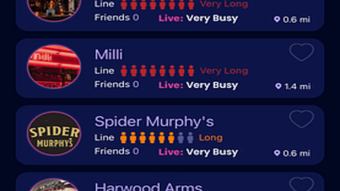
WhichBar is a desktop application designed to enhance the social experience of going out, particularly in urban environments. Targeted at young adults and social explorers, the software aims to simplify the process of discovering and visiting bars and venues. The app provides real-time data on crowd levels and line lengths, allowing users to make informed decisions about where to go and when. This feature helps reduce wait times and improves the overall enjoyment of a night out.
As a beta release, WhichBar is currently in early development, and its functionality is focused on core social discovery features. The app is built for users who value convenience and efficiency when planning social activities. Whether attending a casual gathering or seeking a vibrant nightlife scene, WhichBar offers a digital layer to coordinate and optimize outings. It is intended for individuals who rely on technology to streamline daily experiences and enjoy a more dynamic social life.
Developed for Windows and Mac platforms, the application integrates seamlessly with desktop environments. Its lightweight footprint of 45 MB suggests a focus on performance and quick access. The developer did not provide additional details about the company or development background. Real-world usage scenarios include pre-planning a night out with friends, identifying less crowded venues during peak hours, and using skip-the-line passes to bypass queues at popular locations.
Key Features & Capabilities
- Live Crowd and Line Updates – Users receive real-time information on current crowd density and wait times at bars and venues, enabling smarter decision-making.
- Skip-the-Line Passes – Access to exclusive passes allows users to bypass queues, improving entry efficiency and reducing frustration during busy periods.
- Bar and Venue Discovery – The app curates a list of local venues based on user preferences, location, and real-time availability.
- Event and Atmosphere Insights – Users can view details about current events, music styles, and venue ambiance to match their mood.
- Sync Across Devices – The desktop app syncs with mobile versions, allowing users to start planning on their PC and continue on their phone.
These features are designed to support a seamless social experience. For example, a group of friends can use the app to compare venue wait times before deciding on a destination. The skip-the-line pass can be activated just before arrival, ensuring a smooth entry. The real-time updates are particularly useful during weekends or special events when venues become overcrowded. The app’s ability to display atmosphere details helps users align their outing with their desired experience—whether it’s a quiet cocktail bar or a high-energy dance club.
User Interface, Workflow & Performance
WhichBar features a clean, modern interface optimized for desktop use. Navigation is structured around a central dashboard that displays nearby venues, current crowd levels, and available skip-the-line passes. The layout emphasizes visual cues such as color-coded indicators for wait times and crowd density, making information easy to interpret at a glance.
Workflow efficiency is prioritized through intuitive controls and minimal steps to access key functions. Users can filter venues by type, music genre, or distance with a few clicks. The app’s performance is expected to be responsive, given its 45 MB size and desktop platform focus. However, exact performance details were not specified by the developer.
Stability during extended use and CPU/RAM behavior were not disclosed. General software behavior patterns suggest that a lightweight application like WhichBar should operate smoothly on modern systems. The developer did not provide information on background processes or update frequency. Users can expect a consistent experience if the app runs without interruptions, though no specific metrics were shared.
Compatibility & System Requirements
WhichBar is available for both Windows and Mac operating systems. The software version is 1.0.0, and the installation size is 45 MB. This indicates a compact design, suitable for systems with limited storage space.
Exact system requirements were not listed. Compatibility information is limited to the supported platforms. The developer did not specify minimum CPU, RAM, or graphics requirements. Users should ensure their system meets standard desktop software demands. No additional hardware dependencies were mentioned.
For users running older versions of Windows or macOS, compatibility may vary. The developer did not provide a compatibility matrix or known issues list. It is recommended to check the official site for any updates or patches related to system compatibility.
Pros and Cons
Pros
- Real-time crowd and line updates for smarter venue choices
- Exclusive skip-the-line passes improve entry speed
- Lightweight design with a 45 MB footprint
- Desktop access for convenient planning and coordination
- Free to download and use
Cons
- No detailed system requirements provided
- Performance and resource usage not specified
- App is in beta, so stability may vary
- Limited information about developer background
- Sync with mobile devices not fully detailed
FAQ Section
Is WhichBar available for both Windows and Mac?
Yes, WhichBar is compatible with both Windows and Mac operating systems.
Is the app free to use?
Yes, WhichBar is currently free to download and use.
Can I use WhichBar offline?
The app requires an active internet connection to access live updates and skip-the-line passes. Offline functionality is not available.
How often does the app update crowd data?
Live updates are refreshed in real time, though the exact frequency was not specified by the developer.
Is my data secure when using WhichBar?
While specific security measures were not detailed, the app operates under standard data protection practices for social networking tools.
Final Thoughts + CTA
WhichBar stands out as a promising desktop tool for enhancing the nightlife experience. Its focus on real-time data and skip-the-line access addresses common pain points for social explorers. The app’s lightweight design and free access make it accessible to a broad audience. While still in beta, it shows potential for becoming a go-to companion for night-out planning.
Users who value convenience, efficiency, and real-time insights will benefit most from this software. Whether you're a regular night-out enthusiast or someone looking to optimize your social schedule, WhichBar offers a practical digital solution. The lack of detailed system requirements and performance data is a minor drawback, but the core functionality remains strong.
Download WhichBar now and take control of your next night out.







